Once we read Christin Ditchfield's book, students shared what facts they learned while I recorded their answers. After playing a short multiple quiz game on Johnny Appleseed, they moved to the tables to write about it. It's always amazing to see how far they come in one year. The goal was 2 facts, but many added more!
Elementary Library Media Specialist, Public Library Youth Librarian, Maker, Instructional Tech Teacher and More!
Friday, September 25, 2015
First Grade Learns About Johnny Appleseed
Just finished an awesome class with my first graders! We have been learning about the parts of a book and how to tell if a book is fiction or non-fiction. Today they decided which book was non-fiction by choosing between 2 books on Johnny Appleseed. Students looked at the covers and made predictions on the type of book. They supported their decisions by looking for the index and glossary in the non-fiction book. Also, they saw the fiction story looked cartoonish, had unrealistic scenes and had to be read in order.
Wednesday, July 22, 2015
Back at it Again
It is hard to believe that it is has been almost a year since I last wrote a post! Time flies. I got so wrapped up in the school year and keeping up with social media for the library that I unfortunately neglected this. Anyway, I'm back at it and setting a goal to keep up with this over the next school, by getting a jump start now!
This summer I am once again teaching a Comic Creation course for students from third to sixth grade. I am very lucky to have an excited and creative group of students in the group. It seems like graphic novels and comics are only growing in popularity with some new titles such as Big Nate by Lincoln Pierce and Bird and Squirrel by James Burke.
| Harper Collins |
![]() |
| GRAPHIX |
I teach the class 2.5 hours a day for 4 days. I have made some tweaking based on my experience last year.
Day 1
Students share some of their favorite comics/graphic novels. We go over the main parts and features of comics. Students have an opportunity to browse through comics in the library looking for how the features are used within the comic.
Then students spent the rest of class planning and then creating their own comics using paper templates. Some preferred to make their own template but I provided several comic templates that I found on The Itsy Bitsy Kids Activity Blog.
Day 2
We went over how to plan out your comic and make sure it still has a flow from beginning to end. Students worked with small groups to make a short comic that included...
- First: introduction of setting and characters
- Next: action to move the comic forward
- Last: conclusion, solution or to be continued
Day 3
We discussed the importance of speech and thought bubbles, as well as sounds effects and captions. Each student selected a comic with blank speech bubbles to make their own. This helped emphasize the importance of using these features to help your audience understand the story your telling.
The remainder of the class time students explored the App Strip Designer as a digital approach to comic creation.
Day 4
On the last day students have time to finish any comics they have started and the majority of the class creating one last comic of their choice. This includes using a template, drawing your own template, creating a comic using Word or the app.
Monday, August 11, 2014
Summer Fun Continues with Stop Animation!
This summer I co-taught a week long class with the art teacher. We used the program called Sam Animation which is a stop animation program created by Icreate to Educate. You can click this link to find out more about the software and animation app, ICreate to Educate.
I have co-taught this class two other times. One of the things I really enjoy about this program is it is entirely hands on. Students have full power over what materials they use, the story they tell and how they want to edit it. As teachers we begin the course explaining what stop animation is and how it is made. We show students examples of Stop Animation videos both from the web and from previous classes. Then we give a brief over view of how to set up the equipment and how to access the software. As teachers we model how to use the program and then students spend the rest of the first day exploring the program and making a test video.
After the day of exploration, students use a story map to plan out the contents of their video. Once the planning stage is complete, students gather materials from a variety of provided art materials. Some students use paper and pencil, some use clay, some use a mix of materials such as feathers, buttons, pipe cleaners and much more. We have also had students use legos and stuffed animals in the past to create their movies.
Students were focused and engaged during the whole practice. Every student was able to make more than one movie and the class even asked us to shorten the morning break so they could continue to work! Once students finish creating a video the videos are exported out of Sam Animation and saved as a completed movie. These movies were removed of any student identification and then posted on Youtube.
It's always impresses me with how much creativity our students are capable of and how quickly the time flies by when everybody is engaged.
Click the links to check out some of the students' creations! Pom Pom Love Story, Skater's Match and The Evil Doll.
I have co-taught this class two other times. One of the things I really enjoy about this program is it is entirely hands on. Students have full power over what materials they use, the story they tell and how they want to edit it. As teachers we begin the course explaining what stop animation is and how it is made. We show students examples of Stop Animation videos both from the web and from previous classes. Then we give a brief over view of how to set up the equipment and how to access the software. As teachers we model how to use the program and then students spend the rest of the first day exploring the program and making a test video.
After the day of exploration, students use a story map to plan out the contents of their video. Once the planning stage is complete, students gather materials from a variety of provided art materials. Some students use paper and pencil, some use clay, some use a mix of materials such as feathers, buttons, pipe cleaners and much more. We have also had students use legos and stuffed animals in the past to create their movies.
Students were focused and engaged during the whole practice. Every student was able to make more than one movie and the class even asked us to shorten the morning break so they could continue to work! Once students finish creating a video the videos are exported out of Sam Animation and saved as a completed movie. These movies were removed of any student identification and then posted on Youtube.
It's always impresses me with how much creativity our students are capable of and how quickly the time flies by when everybody is engaged.
Summer Fun with Comic Creation!
In July I taught a class to students grades 3-6 called "Comic Creation." This was a four day class that met for two and half hours per day. I started the class teaching students the main parts of a comic book, such as frames, the gutter and sound effects. Students were able to create their own comics using several different mediums. The first day they hand wrote and drew a comic of their creation using an already made template. Then they used Microsoft Word to build frames, add text, images and speech bubble. Lastly, we used the IPAD app called "Strip Designer" to create comics using student taken photographs and the tool bar feature on "Strip Desinger."
In Microsoft Word students learned about using toolbar features including inserting a text box, copy and pasting images, inserting shapes and then how to format the page.
The app "Strip Designer"by Vivid Apps costs $2.99 through the App Store. My students found it to be very user friendly. The app allows students to create templates, take photos, add text, draw details, add color, speech bubbles as well as adding text, color and page effects. After introducing the app to students, they were each allowed time to play and explore the features of the app. Then students worked with partners to create a comic that had to incorporate actual pictures that they took using the IPADs.
Students were able to be creative and work together. They had a great time using the app and Microsoft Word to create their own comics. Students loved sharing their creations with others and would leave each day buzzing about what they were going to create the next day. I am excited to figure out ways to incorporate comic creation into the school year curriculum and would definitely recommend it to others. The only snag we had was how to get the images off of the IPADs. Our IPADs are not one-to-one devices, but shared among the whole school. We uploaded images to Dropbox for access and sharing later by creating a library account in Dropbox.
On the last day I had a student say he couldn't wait to take the class again next summer. I'd say that's a good sign of a successful class!
Monday, April 7, 2014
Kindergarten Uses Educreations
The kindergarten classes were exploring text of what children's life is like in different places around the world. During a library class students were divided into small groups of about five to six students. Using pages from the book Children Just Like Me by Unicef. This book travels to different countries around the world and writes about children from those countries. It includes information on their homes, families, schools, food and hobbies. With an adult, the group of students read the text and images to gather information on their child. Each student shared something they learned from the non-fiction text.

The following week, students once again worked in their small groups. Each group was given an IPAD with the app Educreations. A teacher helped them insert a picture to represent the country their child was from then each student typed their name on the slide. Next, a teacher assisted students as they each took turns recording the fact they learned from the previous week.
Children Like Me, Russia
Children Like Me, Canada
Labels:
Educreations,
IPADs,
Kindergarten,
research,
technology
Wednesday, April 2, 2014
First Grade Penguin Research
My first grade students research penguins as part of their non-fiction and science unit. This unit provides them the opportunity to practice reading informational text and work on identifying key words and facts while reading. Students find the answers to questions concerning the life, habitat, eating habits and body of penguins. They work with a partner and complete the organizer below. This year we used the database Pebble Go created by Capstone publishing. If you have read some of my other blog posts, you may see a reoccurring theme of using this resource. This is my school's first year purchasing this product and is was well worth the money. It is specifically geared at kindergarten through third grade students and aligned with the Common Core State Standards. I use it a frequently with my first and second grade students especially. The students are easily able to navigate the page. They click on tabs to move to the different pages, each labeled with a heading that matches the ones on their organizer. The database also allows them to define new words with just a click and the audio capability makes it accessible for all students.
The following week I showed the whole class how to use a software program called Kidspiration. At the smartboard I show them how to access the program and the key features I would like them to include. This is another week where we invite parent volunteers into library class to help support the students in the computer lab. I provide parents with a cheat sheet to using Kidspiration so they have a reference guide as they assist students. In the past we have had students work in groups of four to five, but this year we decided to use partnerships with the exception of a few groups of three. This seemed to go much smoother because it eliminated the down time for each child. They worked on collaboration and team work skills as they took turns in the "driver's seat" at the laptops (the seat in front of the keyboard with mouse access). Each group was responsible for the task of creating an idea web showing the research they had found on penguins. They were required to add images and use toolbar functions.
![]() |
| Students typed the main idea and heading for each circle. |
![]() |
| Partnerships added images to support their research. |
![]() |
| Students incorporated tool bar functions by adding background and text box colors. |
The kids really worked well together. Penguins are an animal students find interesting. It was fun to hear them excitedly talking and sharing facts they learned about these birds. Even though we had parent support, students are really able to do a large amount of this project independently with adults their to support and model if needed. The penguin webs they create are a good foundation for additional penguin work that occurs in the classroom.
Labels:
database,
first grade,
library,
penguins,
research
Monday, March 31, 2014
2nd Grade Native American Day
The second graders study Native Americans from four main regions of the United States; Eastern Woodland, Plains, Southwest and Northwest. This unit is a collaboration between classroom time, library/technology and art classes. Each of the three second grade classes are divided into four groups with each group focusing on one topic consisting of food, shelter, geography and clothing of the four regions. These groups take notes on their topic for each of the regions.
Then, after taking notes from informational videos and non-fiction books, students in each of the groups take on one of two jobs; they become a writer or a creator. Over the course of the unit every student will do both jobs. The creators are responsible for building a triarama to represent what life was like in that region. The writers write a paragraph based on their notes describing the triarama. Then the students each type a portion and using Word toolbar features, they change the font style and size as well as add clip art images to support their paragraph.
This unit develops over a few months and is done entirely in school. To wrap up the unit the Library and second grade team host a special Native American Day celebration. It is set up museum style with a question and answer format. Family members are invited to attend. Each class is designated an area in the library. The students sit at tables by their triaramas and parents move through the displays asking students questions written out on sticks at each table. The students have the opportunity to show what they create as well as share the knowledge they gained. It is great to have the opportunity to share beyond our classrooms and the students are beaming with pride as families members look at their work. It's a great way to end a unit and share the hard work of our students!
Then, after taking notes from informational videos and non-fiction books, students in each of the groups take on one of two jobs; they become a writer or a creator. Over the course of the unit every student will do both jobs. The creators are responsible for building a triarama to represent what life was like in that region. The writers write a paragraph based on their notes describing the triarama. Then the students each type a portion and using Word toolbar features, they change the font style and size as well as add clip art images to support their paragraph.
![]() |
| Student creators designed and built triaramas to represent clothing, shelter, food and geography of each region. |
![]() |
| Student writers used the research they gathered to write a paragraph and insert photos describing each region. |
![]() |
| The projects highlight each students creativity and imagination. |
![]() |
| To celebrate the end of this Native American units families came to the library to check out the students work! |
High School Guest Readers!
Since our students met their reading goal of 1,500 hours by reading 1,900 hours they were surprised with high school guest readers in the afternoon. I was pleasantly surprised by the enthusiasm and willingness to guest read by the high school students in town. They gave up some of their own time and it really impacted our elementary students. They enjoyed spending time with students they often see in school plays, on the field and on the court or in the band. The guest readers presented each class with a book to add to their classroom library and pencils for each student. It was a fun way to wrap up an exciting program!
Read Across America Events
![]() |
| Grandparent guest reader. |
Throughout the week we had several guest readers come to the school from the community such as police officers and our superintendent. We also hosted a Grandparents Day including breakfast and grandparents reading in each classroom. I led a storytelling program with kindergarten, first and second graders telling some of my favorite stories. Author Kathleen Benner Duble visited with our third, fourth and fifth grade students. She did a great job demonstrating how inspiration can come from all parts of our life and that students need to take the time to write it down. She led an awesome hands on writers workshop with fourth grade as well.
![]() |
| Storytelling to Kindergarten and first graders. |
![]() |
| Sharing one of my favorite stories, Tikki Tikki Tembo! |
![]() |
| Author Kathleen Benner Duble talks about the writing process with 3rd graders. |
Labels:
author,
Dr. Seuss,
reading,
storytelling,
writing
Third Grade Cloud Research
My third graders have been learning about weather. As a final piece to the science unit, they have been working on a cloud research project. They already gained knowledge on what clouds are, so for the next step students were partnered up and directed to chose a cloud of interest from the four main types of clouds; stratus, nimbus, cirrus and cumulus. Then using the Pebble Go Earth and Science database and non-fiction books students completed the graphic organizer below. Throughout the year we have been focusing on note-taking format. Students are taught to focus on the main idea and supporting facts while using a bullet point format.
After the students finished their research they began work on a Photostory. Photostory is a computer program where students can create media presentations that combine images, text and voice recordings to make a short movie . The program is very user friendly and easy for students to navigate. So far, students have worked on creating a script for their video and also drew a picture to illustrate the type of cloud they learned about. This week they will start to record the Photostory. I will post their videos soon!
![]() |
| They loved that nimbus clouds bring stormy weather! |
![]() |
| A drawing depicting the good weather brought on by Cirrus clouds. |
Labels:
education,
note taking,
science,
weather
Tuesday, March 4, 2014
Celebrating Read Across America!
My school is celebrating Dr. Seuss' birthday and Read Across America with a week long series of events. In addition to fun days such as Grandparent Day and Wacky Wednesday I work in collaboration with the music teacher to make a music video promoting reading. This year the student council chose Macklemore's Thriftshop. The song was changed to Book Shop. Third, fourth and fifth grade students, teachers and staff took part in the video. Students learned a dance to the song in PE and then the words to the song in music class. Fifth grade students came before school to film additional parts of the video. The school was very excited for the video premiere this past Monday to kickoff our fun filled week!
Kindergarten Explores Bears
Kindergarten used the Pebble Go Animal database to research several different types of bears. Together as a whole class we researched Black Bears. The database does a great job of being aligned to the Common Core State Standards. Students used page tabs to click and learn about the habitat, life cycle, food and size of the bears. Then in small groups students filled out a research book on Polar, Grizzly and Panda bears.
The following class students were shown how to use the Doodle Buddy app. Then with a partner they drew images of the type of bear of their choice and typed their name. These images were saved to the camera roll then posted onto a Padlet wall.
Check out the kindergarten digital artwork by clicking here!
Doodle Buddy Bear Drawings
Sunday, February 9, 2014
A third grade teacher approached me about using IPADs to create some sort of math video. She wanted the students to create rhymes that would help them learn and teach others the math facts. She had divided her class into groups with each group being responsible for a certain multiplication math fact set. At first she as thinking of recording the kids saying their facts, but then I mentioned the app Educreations. I had been wanting to use it with a class and this seemed like a great opportunity. We scheduled some extra time for her class to come to the library to learn how to use the app. I went over the basics with the class and then they had time to explore and play with app.
The following day they came back down with their rhymes completed. I showed the class an example I created so they could get a better understanding of what the final products would look like. Then they started to create their slides. Students were encouraged to keep it around five slides and reminded that their words would provide the additional information. They continued working on the slides in their classroom and then came down for one final library time to record. The groups were various sizes. The classroom teacher and I learned that groups of two were able to create and record smoother than the larger groups. The groups of four and five students struggled a little with the wait time until they were able to record or add graphics and how to divide up the work load.
Overall the students did a really nice job. They were having fun, smiling and laughing, but were on task and working hard. They were very excited when they shared their videos with the whole class.
The 3's Facts
The 8's Facts
The fifth grade social studies teacher and I worked in collaboration on an Explorer unit. Students were given five questions to research. They worked with a partner. Students then were told they had to present to the class before February vacation. They can present in any format they want. Some students took the opportunity to try something new while others chose a presentation method they had experience with already. Students created Power Points, Photostories and then some used apps to for their presentations. They had to include the answers to the five questions, but it was neat to see how they creative they can be.
One of my groups created a short movie using the app Tellagami. Tellagami allows users to create an avatar. Then they can type in text and the avatar will read it. They stumbled upon two problems. One, the free app limits the amount of text you can add. They decided to create two separate Tellagami's so they could include all of their information and then combine them together in IMovie. The second problem was, the avatar didn't always pronounce everything correctly. They girls had to figure out how to phonically sound out some words so they avatar would pronounce it the right way.
Explorer Tellagami
Another group used the app Educreations to create a short video. Educreations is basically a way to screencast a series of pages and add images and recordings. This group liked how accessible and easy to use Educreations is, however they learned the hard way the apps biggest downfall. Unfortunately, you can not save the project as a draft. It needs to be created straight through or you will loose your work. Even once logged in their doesn't seem to be a way to save and unfinished product. (If anyone has figure out how to, please share!) After a third attempt the group created a successful video.
Explorer Educreations
Labels:
education,
explorers,
IPADs,
library,
technology
Friday, February 7, 2014
Character and Setting
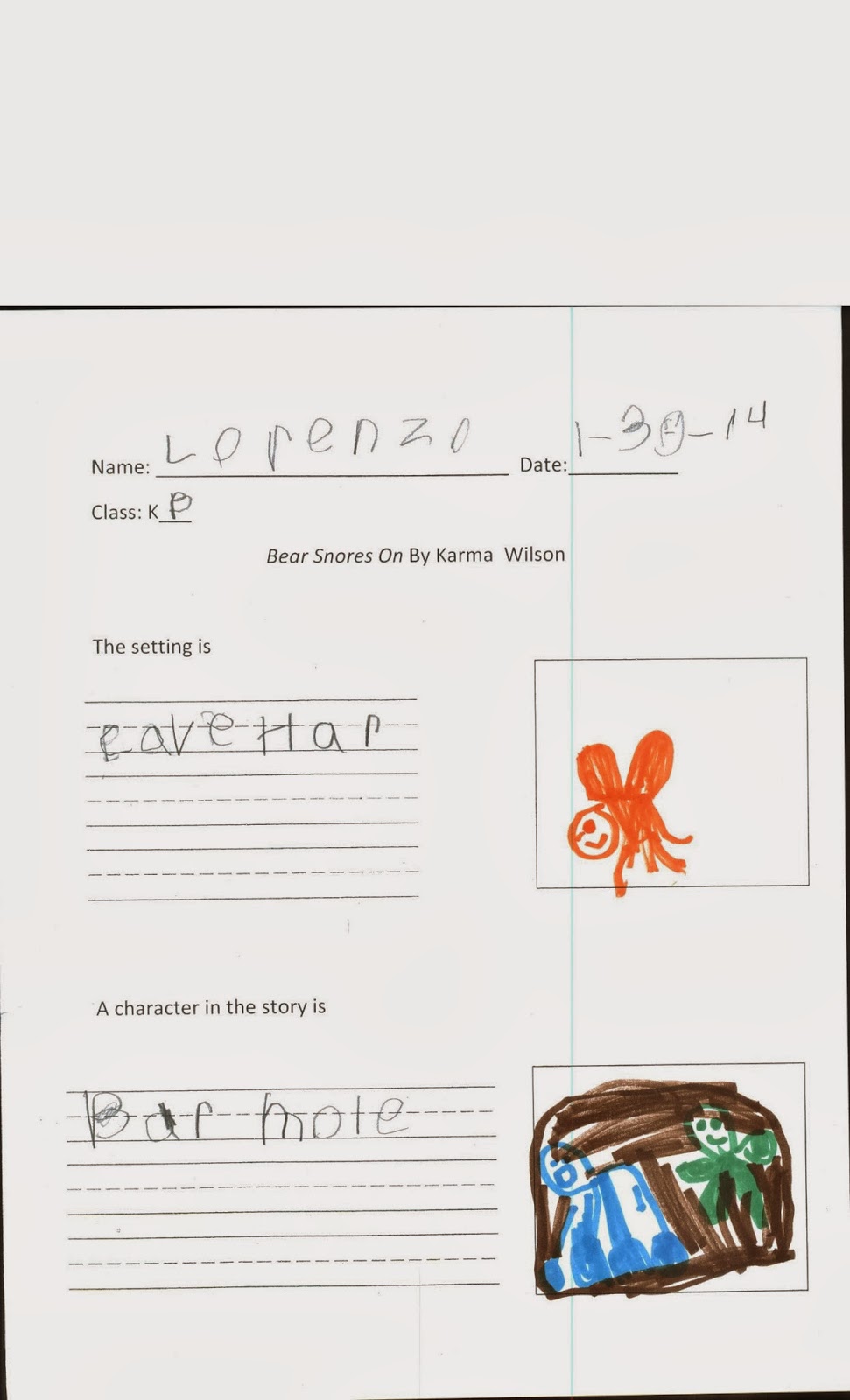
My kindergarten classes have been spending some time learning about characters and setting in a story. We used the story Bear Snores On by Karma Wilson. First, we reviewed what jobs the author and illustrator do. Then I introduced our two new words, character and setting. We made some predictions based on the cover of the book. What characters do you think could be in the book? Where do you think this story takes place? With those questions in mind the students listened to the story. They gave a thumbs up every time a new character was introduced into the story. Then we added each character to a list.
The following week the students retold the story upon entering the library. Then they were given the handout below to record what characters are in the story and where it takes place. They did a great job!


Labels:
character,
Kindergarten,
Litearcy,
picture books,
setting
Thursday, February 6, 2014
Sharing Revolutionary Biographies with IPADs
As part of the third grade curriculum students learn about the American Revolution. This year we decided to research important people of the Revolution. Students started by collecting information using the statewide databases.
Then I introduced students to an app called Skitch. The students were able to pull images of their revolutionary person from the web and then annotate them. During the first class they learned the basics of the app, such as how to add an image and the tool bar functions. The following class they created their Revolutionary Biography Skitch.
Next, I taught students how to use a QR code to access their class wall on Padlet.com. Padlet is a great way to easily share work in a public space. The students were able to teach each other how to post onto the page and by the end of the class everyone had an annotated picture posted. The class will use the slide show feature in Padlet to present to the class. The students were focused the whole class and were excited to see their classmates work on the wall.
Check out their work by clicking on the link below.
Our Padlet Wall
Labels:
american revolution,
IPADs,
library,
QR codes,
technology
Saturday, January 18, 2014
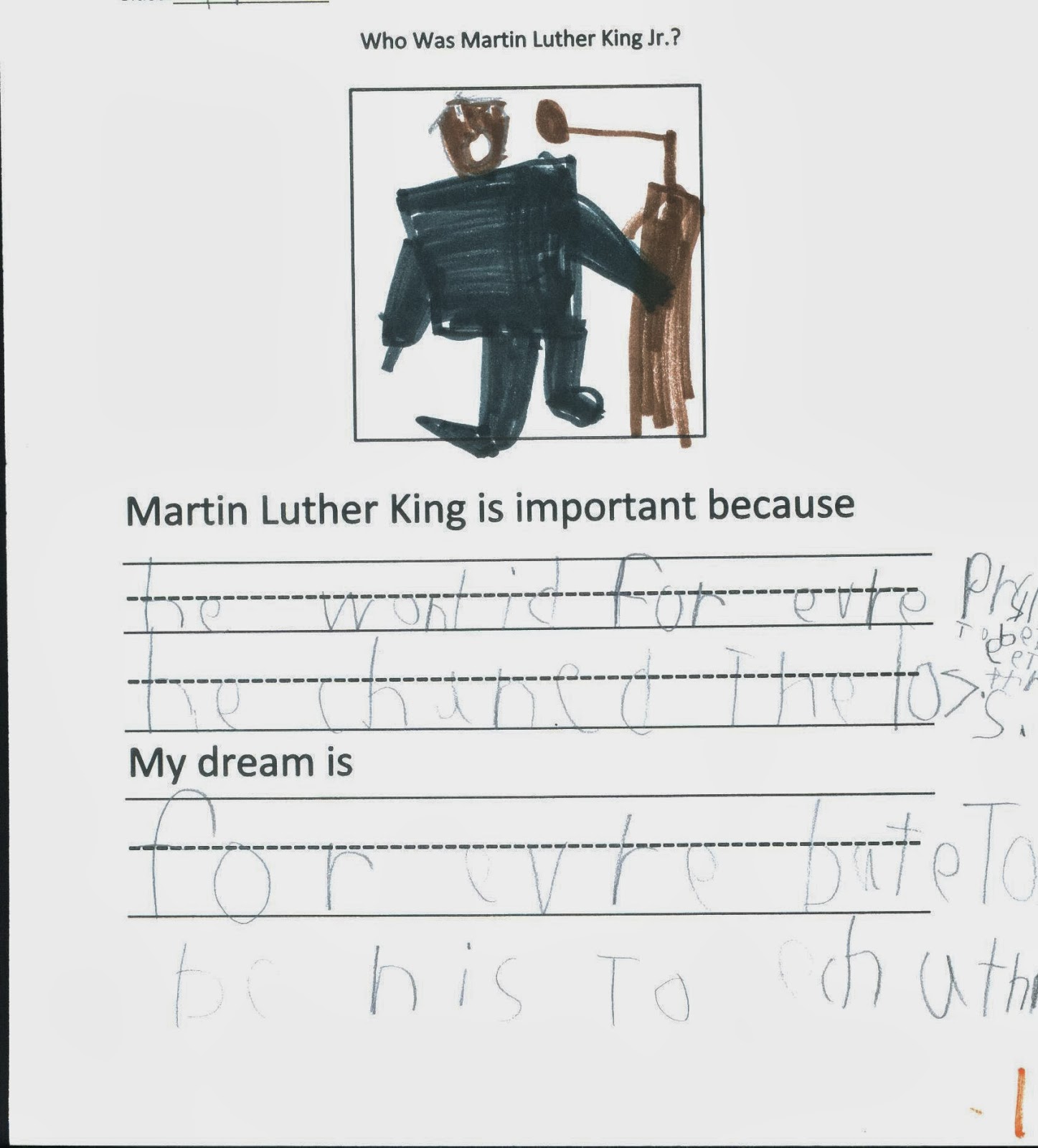
In honor of Martin Luther King Day the first graders spent some time learning about this great man. Students first shared and brainstormed their prior knowledge on Martin Luther King, Jr. Then, as an exercise to understand what segregation was like, students were divided by their eye color. They were told they would not be allowed to play, go to school, eat and even drink out of the same water fountain as the other group. Students next shared how that made them feel. Then they were asked if they would stand up to this unfair law or rule. All classes unanimously agreed they would stand together against the law.
Martin's Big Words by Doreen Rappaport
Happy Birthday Martin Luther King by Jean Marzollo
We then talked about how this is exactly what Martin Luther did. Students then researched more about Martin Luther King, Jr. using the database Pebble Go! Then they listened to the story Martin's Big Words by Doreen Rappaport. Afterwards, the students then did some writing on why Martin Luther King is important and what their dream would be for the world.
Subscribe to:
Posts (Atom)


.jpg)